
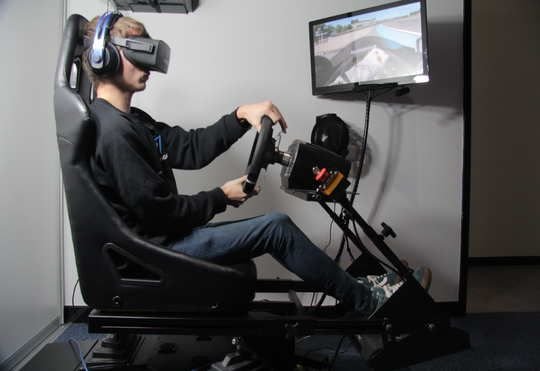
Interactive VR & Motion Racing Simulator Station on Rent in Delhi
An Interactive VR & Motion Racing Simulator Station on Rent in Delhi can turn an ordinary event into an exciting gaming experience where guests can step into virtual worlds, take the driver’s seat, and compete for the fastest lap. Whether you are planning a corporate event, exhibition, college fest, product launch, birthday party, or private celebration, an interactive simulator station can become a memorable attraction for guests who enjoy technology, gaming, and friendly competition.
Unlike conventional entertainment activities, a VR and racing simulator setup gives participants something immersive to experience. Guests can explore virtual environments using a VR headset or test their driving skills with a racing wheel, pedals, screen, and simulator seat. Depending on the equipment selected, a motion-enabled simulator may also provide physical movement that responds to the driving experience.
For event organisers, this type of gaming station offers more than just a place to play. It can become a dedicated activity zone where guests take turns, challenge their friends, compare scores, and watch others race.
What Is an Interactive VR and Motion Racing Simulator Station?
An interactive VR and motion racing simulator station is an entertainment setup designed to recreate aspects of driving or virtual reality in a controlled environment.
The exact equipment varies by package. A basic racing simulator may use a steering wheel, pedals, a gaming display, and a fixed seat. More advanced configurations can include multiple screens, a cockpit-style seat, force-feedback controls, or a motion platform. A VR station uses a compatible headset and interactive software to create an immersive virtual experience.
These features are not automatically included in every setup, so it is important to confirm the equipment before booking.
A rental station may include some of the following components:
- VR headset and compatible gaming system
- Racing simulator seat or cockpit
- Steering wheel and pedals
- Gaming display or multiple screens
- Compatible racing and simulation games
- Motion platform, if included in the selected package
- Setup and installation support
- On-site operator or technical assistance, if arranged
The right configuration depends on the event format, available space, guest profile, and budget.
Why Choose a VR Racing Simulator for Events in Delhi?
A Different Kind of Guest Experience
Many events already include music, food, photography, and stage entertainment. A simulator introduces a more interactive option that guests can experience individually or in short sessions.
Participants can take on a virtual racing challenge, try to improve their lap time, or experience a game they may not have used before. This creates an activity that guests can talk about even after their session ends.
Friendly Competition Between Guests
Racing simulators naturally lend themselves to timed challenges. Guests can compete for the fastest lap, complete a set number of laps, or take part in a friendly knockout format.
For organised events, a leaderboard can display participant names and scores, provided the selected equipment or software supports it. This gives spectators a reason to follow the action and encourages other guests to take their turn.
Technology That Attracts Attention
A well-presented gaming station can draw attention at exhibitions, promotional activities, and corporate gatherings. The simulator itself becomes a focal point, while clear signage and a visible score display can help people understand the activity.
For brand-focused events, organisers can explore custom signage, themed challenges, and other branding options where the equipment and event arrangements allow them.
VR Gaming vs. Racing Simulation: What Is the Difference?
Although these activities can be combined, they provide different experiences.
VR gaming uses a headset to immerse players in a virtual environment. Depending on the software, guests may explore a virtual world, complete a challenge, or interact with objects using motion controllers.
Racing simulation focuses on the driving experience. Participants use a steering wheel and pedals to control a virtual vehicle on a track or in another driving environment.
Motion racing simulation adds a compatible motion platform that moves in response to supported game data or simulation inputs. The level of movement depends on the particular system.
If your event needs both virtual reality and racing, ask whether the rental package includes two separate stations or one combined configuration. The distinction affects equipment, space, guest throughput, and overall cost.
Best Events for an Interactive VR & Motion Racing Simulator Station on Rent in Delhi
The flexibility of a simulator station makes it suitable for several event formats. The key is to adapt the activity, session length, and equipment to the audience.
1. Corporate Events and Employee Engagement
A VR racing simulator can introduce a fun challenge to an office celebration, annual function, employee engagement day, or corporate family event.
Employees can compete individually or participate in team-based rounds. For example, each department can nominate drivers, and the organiser can compare their best lap times at the end of the session.
A structured format works well when many employees want to participate. Keep each turn short, display the rules clearly, and allow enough time for guests to learn the controls.
For more workplace entertainment ideas, explore Corporate Games.
2. Exhibitions and Trade Shows
At exhibitions, the challenge is often to encourage visitors to stop at a stall and interact with the brand. A racing simulator can provide an activity that draws attention and gives visitors a reason to spend time at the booth.
Organisers can consider a timed racing challenge, branded leaderboard, or prize-based competition, subject to the event’s rules. The setup should leave sufficient space for spectators without blocking nearby stalls or walkways.
For an exhibition, confirm the installation dimensions, power requirements, loading access, setup schedule, and any restrictions imposed by the venue.
3. Product Launches and Brand Activations
For a product launch, a simulator can become part of an experiential activity rather than simply another piece of equipment in the venue.
For example, an automotive-themed event might use a driving challenge, while a technology campaign could feature an interactive gaming experience. Branding can be incorporated through signage, scoreboards, backdrops, or event graphics, depending on what the provider can support.
Any connection between the simulator software and a real product should be planned in advance rather than assumed to be available.
4. College Fests and Gaming Events
College fests often attract participants who enjoy trying new games and competing with friends. A racing simulator can be included in a gaming zone, technology event, festival activity area, or inter-college competition.
For larger gatherings, consider pre-registration, numbered turns, and a clear scoring system. These arrangements can reduce confusion and help the operator manage participation during busy periods.
If the event includes multiple gaming attractions, a dedicated arcade games rental setup can complement the simulator station.
5. Birthday Parties and Private Celebrations
A simulator can add a distinctive attraction to a gaming-themed birthday party, teenager’s celebration, or private gathering. Guests can take turns racing while others watch the competition.
For family events, check the manufacturer’s or operator’s age and height guidance, headset suitability, seating adjustments, and any restrictions on motion-enabled equipment. Choose the setup according to the actual participants rather than selecting the most advanced configuration by default.
You can also explore birthday party entertainment for additional activity ideas.
6. Mall Activations and Public Events
At malls and public promotional events, the simulator can work as an interactive attraction that invites visitors to participate. A short game format is usually easier to manage when footfall is unpredictable.
Organisers should plan a queueing area, clear instructions, an operator’s position, and enough space for people to enter and exit safely. If scores or visitor details are collected, the event team should explain the process and handle personal information appropriately.
How to Choose the Right Simulator Setup
Not every event needs a full-motion racing cockpit. The best choice depends on the experience you want to create.
For casual entertainment: A straightforward racing wheel, pedals, screen, and seat may be sufficient.
For an immersive VR experience: Choose a compatible headset and software suited to the intended audience, with a safe play area and assistance for first-time users.
For a premium racing attraction: Consider a cockpit-style simulator, force-feedback controls, multiple displays, or a motion platform where available.
For a competitive event: Ask about lap timing, score tracking, repeat attempts, and leaderboard support.
Before confirming the booking, request a clear equipment list. The terms “VR simulator,” “racing simulator,” and “motion simulator” can refer to different configurations, so the package description should specify exactly what will be delivered.
Space and Technical Requirements for a Simulator Station
Planning the venue correctly helps prevent delays during installation and operation.
Check the Available Floor Area
A simulator requires more room than the visible seat alone. The complete footprint may include the cockpit, screen or screens, VR play area, operator position, cables, and space for participants waiting their turn.
Ask the rental provider for the actual dimensions of the selected setup. Confirm whether the station will be installed indoors or outdoors and whether the venue has suitable flooring, access routes, and clearance around the equipment.
Confirm Power and Connectivity
Gaming systems, displays, and motion equipment may require electrical connections. Ask the provider about power load, socket requirements, cable routing, and backup arrangements where necessary.
Do not assume that every station needs an internet connection or that every game can run offline. Confirm the software requirements for the selected configuration before the event.
Plan the Participant Queue
A simulator is usually operated by one participant at a time unless the chosen configuration supports multiple players. At a busy event, the queue can become longer than expected if each session includes equipment adjustment, instructions, gameplay, and a changeover.
Estimate the available event time and expected participation. If many guests are expected, consider shorter sessions or additional stations, subject to the budget and venue space.
Allow Time for Installation and Testing
The simulator should be installed and tested before guests begin participating. Arrange a setup window that gives the technical team time to check controls, display output, game settings, headset tracking if applicable, and motion functions if included.
For a timed event, confirm the arrival and installation schedule in writing so the activity is ready before the programme starts.
Safety Tips for VR and Motion Racing Simulators
An immersive setup should be operated with suitable precautions, especially when guests are unfamiliar with VR equipment or motion platforms.
- Follow the equipment manufacturer’s age, height, weight, and usage guidance.
- Keep the simulator on a stable surface and maintain clear space around moving parts.
- Secure cables so they do not create trip hazards.
- Have the operator explain the controls before each first-time session.
- Allow participants to stop if they feel dizzy, uncomfortable, or unwell.
- Clean shared headsets and controllers between users according to the equipment guidance.
- Keep food and drinks away from the gaming equipment.
- Supervise children and follow the operator’s age recommendations.
- Avoid unauthorised adjustments to motion settings or hardware.
- Keep emergency exits and venue access routes unobstructed.
VR can cause discomfort or motion sickness for some people. Participation should be voluntary, and guests should be able to stop a session whenever needed.
What Affects the Rental Cost in Delhi?
The cost of an Interactive VR & Motion Racing Simulator Station on Rent in Delhi depends on the equipment configuration and the requirements of the event. A basic racing setup may have different rental terms from a VR station or a motion-enabled simulator.
Factors that can affect the quotation include:
- Type and number of simulator stations
- VR headset and gaming equipment configuration
- Whether a motion platform is included
- Rental duration and event date
- Venue location and transportation
- Installation and dismantling requirements
- Operator or technical support
- Branding and leaderboard arrangements
- Venue access and setup timing
Rather than relying on a general price estimate, request a quotation based on your event details. Confirm what the price includes, whether overtime charges apply, and how cancellation or equipment-failure situations are handled.
Booking Checklist Before You Confirm
Use this checklist when contacting an event entertainment provider:
- Share the event date, venue address, and operating hours.
- Explain whether the event is corporate, promotional, educational, or private.
- Estimate the number of participants.
- Ask for the exact simulator model and equipment included.
- Confirm whether VR, motion functionality, or both are part of the package.
- Check the required space, power supply, and access arrangements.
- Confirm the delivery, installation, testing, and collection schedule.
- Ask whether a trained operator will remain at the venue.
- Discuss session length, queue management, and leaderboard options.
- Get the complete quotation and booking terms in writing.
These details help you compare options and select a setup that fits the event rather than paying for features you may not need.
Book Interactive VR & Motion Racing Simulator Entertainment
A racing simulator can offer guests a hands-on activity that combines gaming, technology, and friendly competition. From corporate engagement and exhibitions to college fests and private parties, the right setup can become a central attraction when it is planned around the venue and audience.
Explore Party Events for event entertainment options. If you are planning a larger gaming area, you can also browse games on rent in Delhi NCR and indoor games on rent in Delhi.
When enquiring, share your event date, location, guest count, available space, and whether you specifically require a VR headset, a racing simulator, or a motion-enabled setup. Confirm current availability, final charges, and technical requirements directly before booking.
Final Thoughts
An Interactive VR & Motion Racing Simulator Station on Rent in Delhi can give an event a modern entertainment feature that encourages guests to participate rather than simply watch. The most effective setup combines suitable equipment with a well-planned layout, clear instructions, trained assistance where required, and a smooth system for managing turns.
Whether you are arranging a corporate gathering, exhibition, product launch, college fest, or birthday celebration, choose the simulator based on the audience and the experience you want to deliver. With the right preparation, a racing challenge can become one of the most talked-about activities at your event.
Follow Party Events
- Facebook: Party Events
- Instagram: Party Events
- Pinterest: Party Events
- X: Party Events
- YouTube: Party Events
- Business listing: Party Events on Hotfrog
Content & SEO: HiveRift
